Making Web Api calls more scalable
While dealing with scalability, there are number of classes that are expensive(in terms of performance and/or scalability) to instantiate…
Making Web Api calls more scalable
While dealing with scalability, there are number of classes that are expensive(in terms of performance and/or scalability) to instantiate them (like: Microsoft.ServiceBus.Messaging.QueueClient, Microsoft.Azure.Documents.Client.DocumentClient, StackExchange.Redis.ConnectionMultiplexer and System.Net.Http.HttpClient etc )
The class that I want to bring up the conversation about is: System.Net.Http.HttpClient which is used to make HTTP calls to external APIs from our C# code and instantiating this class is considered one of the expensive ones.
So, here is a simple HttpClientHelper class that enables you to make HTTP calls:
namespace HttpClientInstantiationTest.Tests { public class HttpClientHelper { public async Task<HttpResponseMessage> CallHttpClientGetAsync(string requestUri, string authHeader) { using (var client = new HttpClient()) { client.DefaultRequestHeaders.Authorization = new AuthenticationHeaderValue(authHeader); var response = await client.GetAsync(requestUri); return response; } } } }
In a web application, this way of creating the HttpClient instance is not considered scalable under a lot of load of requests. As per people’s experience this could lead into some SocketExceptions creating the objects.
To see the behavior of this method in action we can have a simple unit test method that calls GET method like this:
[TestMethod] public async Task GetAsyncTestNotScalable() { var sut = new HttpClientHelper(); var authHeader = Guid.NewGuid().ToString(); var result = await sut.CallHttpClientGetAsync(endpoint, authHeader); var content = await result.Content.ReadAsStringAsync(); Assert.AreEqual(authHeader,content.Replace("\"", "")); }
Now, for doing some load test for this method, you can right click on the Test project and select Add and you can add the Load Test from the menu you see below:
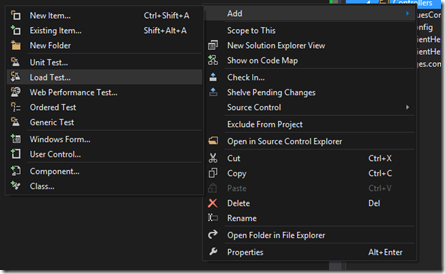
When you click on the Load Test, go through the wizard and select the “GetAsyncTestNotScalable” test method to create the load test for, and then run the load test. I ran the test with all the default values and steps to load users and here is the result of the load test.
GetAsyncTestNotScalable: Average Test Time (millisecond) : 140 ms
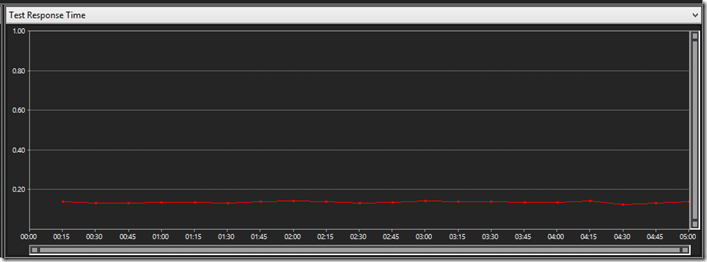
Key indicators:
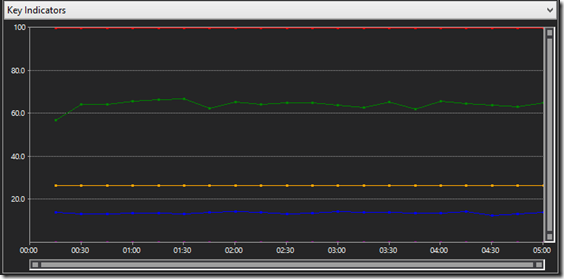
Legend helpers for Key indicators:

And in this case there is no failed test result, meaning that in all tests, whatever key we passed in as Authorization header, we got the same key back.
Now we will try to make an scalable class for instantiating the HttpClient like this:
namespace HttpClientInstantiationTest.Tests { public class HttpClientHelperScalable { private static readonly HttpClient httpClient; static HttpClientHelperScalable () { httpClient = new HttpClient(); } public async Task<HttpResponseMessage> CallHttpClientGetNoLockUsingRequestAsync(string requestUri, string authHeader) { HttpRequestMessage request = new HttpRequestMessage(HttpMethod.Get, requestUri);
request.Headers.Authorization = new AuthenticationHeaderValue(authHeader); var response = httpClient.SendAsync(request); return await response; } } }
As you can see the approach is to have the HttpClient instance as a static member of the class and instantiate it.
Note:One very important point to know here is that for the implementation with the Static constructor, we used the httpClient.SendAsync() method so that we can pass in the Authorization header as a private member to the method so that since the httpClient is a static member, the Authorization headers for different threads in multithreaded scenarios does not get replaced with other requests.
Now we repeat the steps above and create a test method to call this new Scalable method and here is how the test method will look like:
[TestMethod] public async Task GetAsyncTestScalable() { var sut = new HttpClientHelperScalable(); var authHeader = Guid.NewGuid().ToString(); var result = await sut.CallHttpClientGetNoLockUsingRequestAsync(endpoint, authHeader); var content = await result.Content.ReadAsStringAsync(); Assert.AreEqual(authHeader, content.Replace("\"", "")); }
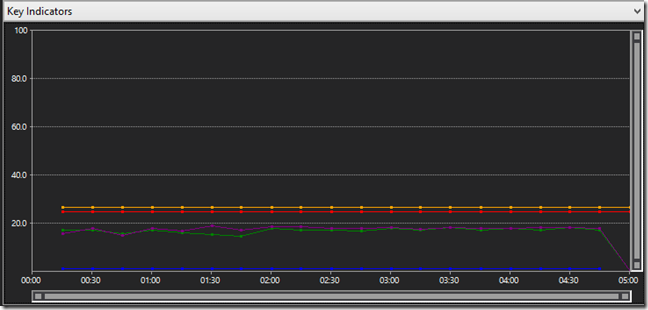
Now, again we can go ahead and add a load test for this test method with the same load numbers (default numbers in the load test wizard) and after running the test I got the below result:
GetAsyncTestScalable: Average Test Time (millisecond) : 12 ms
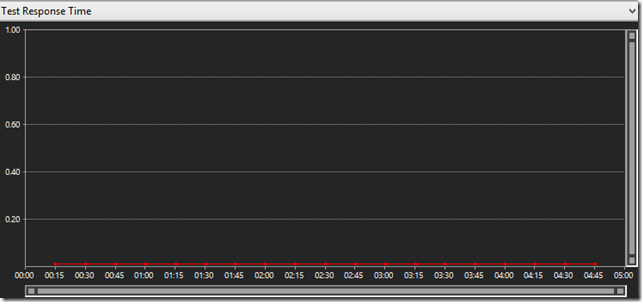
Key indicators:
Legend helpers for Key indicators:

yes so as you can see the comparison about performance is obvious: 140 ms for non-scalable Vs 12 ms for scalable.
You can find the source code for this test on Github here: https://github.com/aramkoukia/HttpClient-Instantiation-Test
Hope this makes your client code a bit faster and more scalable with this huge performance gain!