Common SQL Problems: De-duplicating Data
In real production databases, we really should not face the problem of duplicate data, because we definitely have a UNIQUE constraint on…
Common SQL Problems: De-duplicating Data
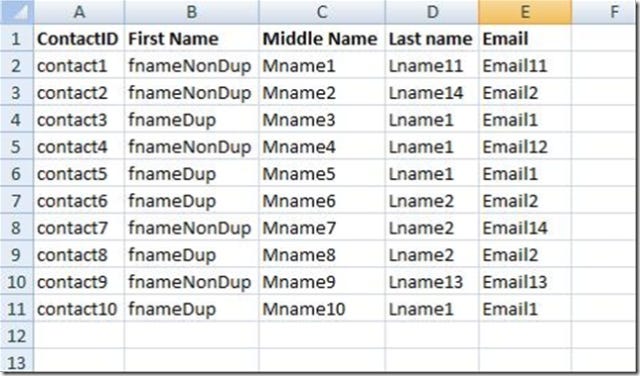
In real production databases, we really should not face the problem of duplicate data, because we definitely have a UNIQUE constraint on our logical key on the table so we won’t end up cleaning duplicates in our tables, but there are some cases that we face this, like in times when we import some data from some external data source like Excel or something, or fetching data from some web service endpoints and then we are going to remove the duplicate values from our tables.
Before SQL Server 2005 and introducing the Windows Functions, there were some traditional ways of doing it and they were, using a Cursor to go through the rows and figure out if the row is a duplicate and delete all but one of them, or I remember implementing this with using a distinct over the logical key of the table to a temp table, and then clean up the original table and then rewrite back the data from the temp table to the original table.
Of course you will face numerous problems doing that with problems like Foreign Key constraint and stuff while trying to remove data from the original table, which even now with using the ROW_NUMBER() and the Windows Functions you still have to do it.
So here is the way I do this de-duplication after SQL Server 2005. I am going to use the ROW_NUMBER() and Partition By clauses to do it like this:
Say you have a table with the following data in it:
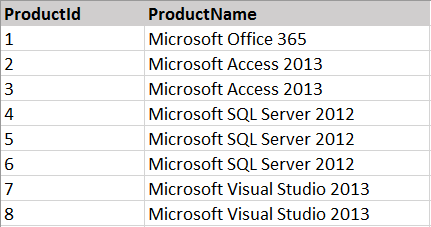
And then I’ll use the RowNumber and the Partition By to put a row number column for each row, in a way that it gets reset after the changing of the Logical key of the table (you are going to have to put the logical key of the table in front of your PARTITION BY clause):
So the result will look like the following:
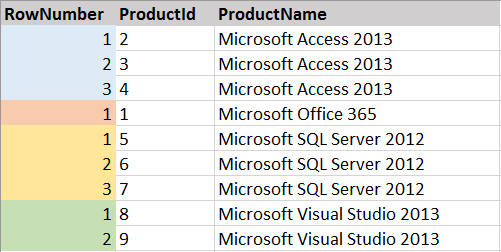
As you can see all the duplicate rows that we are going to get rid of, are all RowNumber > 1 and as you can guess what I am going to do next is to delete all the rows from this CTE with the RowNumber > 1 clause like below:
DELETE FROM myCTE WHERE RowNumber > 1
Obviously, this will delete rows from the underlying table of the CTE table expression.
But before doing that, you can make this more complete with adding checks for the foreign keys, so that you don’t see foreign key constraint violation at the time you want to commit the delete command.