Calculate Code Metrics in Visual Studio
A while a go, one of my friends(Nima Sh.) asked me about the way we deal with the code metrics in our Microsoft project and that made me to…
Calculate Code Metrics in Visual Studio
A while a go, one of my friends(Nima Sh.) asked me about the way we deal with the code metrics in our Microsoft project and that made me to write something about that and how we do it and what kind of metrics are important for us and what tools to we use to do that.Basically what we do is for each project we check the Maintainability index like this:
I right click on the Project I want and choose: “Calculate Code Metrics”
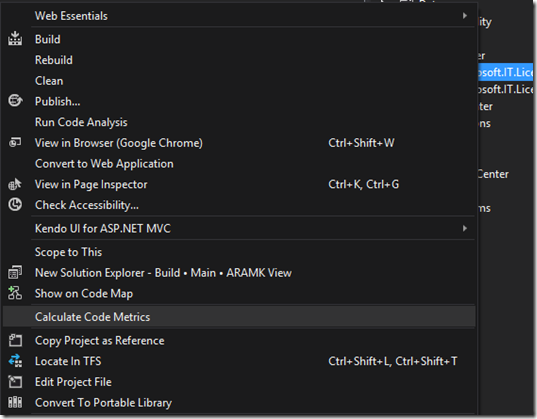
After doing that, Visual studio will open up a window like below and starts calculating different metrics for us.
The interesting thing is that you can see all 5 metrics at the project level, as well as the Class level and even Function level, so this way you can track the problem down to the functions that are not Green and fix those.
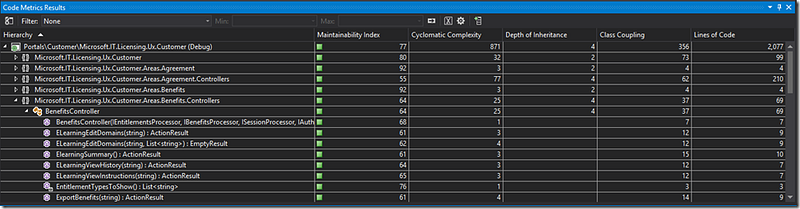
As you can see these 5 code metrics are the ones that this tool is going to show us:
- Maintainability Index
- Cyclomatic Complexity
- Depth of Inheritance
- Class Coupling
- Lines of Code
you can find the description and definition and more detail on these code metrics in here:
http://msdn.microsoft.com/en-us/library/bb385914.aspx
and here:
http://msdn.microsoft.com/en-us/library/bb385910.aspx
but what we will be tasked for in our project is to keep the first code metric, meaning, Maintainability Index over 70, and I usually have been able to do that simply by breaking up huge functions into smaller ones and tweaks like that.
I still don’t really know where that number 70 comes from, but I will let you know as soon as I find out about it.