A little better interaction with Team Foundation Server
When on a Microsoft Visual Studio project and using Team Foundation Server, and no extra extensions, you have probably noticed that there…
A little better interaction with Team Foundation Server
When on a Microsoft Visual Studio project and using Team Foundation Server, and no extra extensions, you have probably noticed that there are certain things that look very simple but still you can’t do them.
One of the things that are painful that you can’t really do is, say you have a file or class or project open in Visual Studio and you want to go to the Source Control location of that file, now what do you do? You have to know where it is stored! Open Your Team Explorer window, go to Source Control Explorer and start Expanding and Expanding and expanding the tree so that you get there. And you do it so many times in a day!
No here is a tool that will help you with that.
TFS Productivity Pack: https://visualstudiogallery.msdn.microsoft.com/1a8f5f25-941c-490c-a1c4-e26b4895be6c
Just install this extension( Supports Visual Studio 2013 ) and restart your Visual Studio.
Here is how it works:
Select the file that you want to find it in Source Control, right click and select “Open In Source Control Explorer”
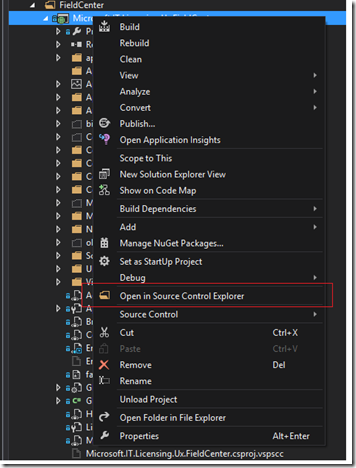
And boom!, it will open it up in Source Control Explorer window…
There are a number of other features in this extension which you can see them in the link above in Visual Studio Gallery page that you might find useful (I didn’t since I had other tools for those kind of things)
Hope you find this a relief!