A good Visual Studio extension that will save you some time
When you are dealing with large solutions, and there are tons of cross project references in your solution, it happens quiet often that you…
A good Visual Studio extension that will save you some time
When you are dealing with large solutions, and there are tons of cross project references in your solution, it happens quiet often that you break the build while you are actively coding. Specially when doing re-factoring, your test methods might be affected by your changes and they might break initially.
The problem is you start to build your solution and you have missed a semicolon or something somewhere in one of your projects, not that project will fail to build and then all the other projects that has a reference to the broken one, is going to look for that DLL and their are not going to find it and you will end up sitting there and wait for Visual Studio to build all your 50 projects in your solution and report that 49 of them are failing! and that’s going to take a long time specially if the build is not successful.
Visual Studio by default will keep building the solution even though it finds a broken project, but what I always wanted was it to stop once there is a broken code somewhere…
So here Visual Studio extensibility feature comes handy and frustrated and impatient developers have build this so that once something is wrong and the first project is failed to build, the build process will be stopped right away.
Here is the link for the Extension you need: (StopOnFirstBuildError is the name of the extension)
https://visualstudiogallery.msdn.microsoft.com/91aaa139-5d3c-43a7-b39f-369196a84fa5
After installing this extension and restarting your Visual Studio you will see this option in the Build menu:
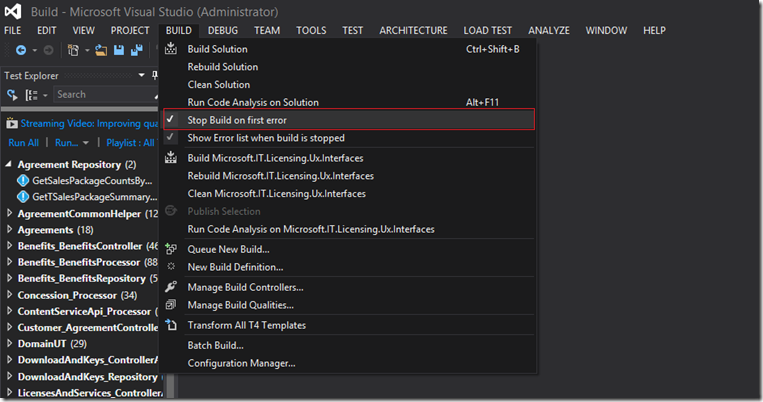
With is option checked, your solution build will stop once the first compile issue is found by Visual Studio, so you don’t have to wait and get hundreds of annoying errors and waste 10 minutes for the build to complete for a missing semicolon.