Interactive interpreter variables in #JavaScript
Useful helper commands while debugging JavaScript
Interactive interpreter variables in #JavaScript

Useful helper commands while debugging JavaScript
Note that most of the following commands only work in the developer tools of certain browsers. Supported browsers are called out in the table end of this page.
$_ gives you the value of whatever expression was evaluated last.
"last expression" // printed "last expression" in browser console $_ // prints "last expression" in the browser again
$0 refers to the DOM currently selected element in the browser Inspector.
ie: if <div id="myDiv"> is highlighted:
$0 // <div id="myDiv">$0.getAttribute('id') // "myDiv"
$1 refers to the previously selected element,
$2 to the one selected before that, and so forth for $3 and $4.
To get a collection of elements matching a CSS selector, use $$(selector). This is essentially a shortcut for document.querySelectorAll.
var images = $$('img'); // Returns an array or a nodelist of all matching elements
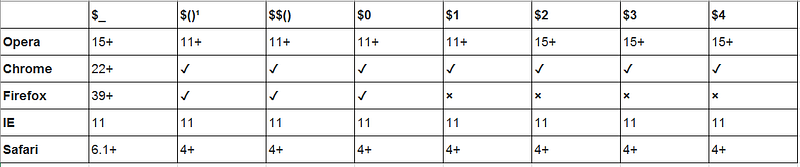
Following table shows you which browsers support these interpreter variables we discussed above.
More Helper commands
The JavaScript command line offers a few more built-in helper functions that make certain tasks easier while using the browser debugging console.
$$()Looks up a CSS selector string, returning a list of DOM nodes that match. This is a shortcut for document.querySelectorAll().
$x()Evaluates an XPath expression and returns an array of matching nodes.
keys()Given an object, returns a list of the keys (or property names) on that object. This is a shortcut for Object.keys.
values()Given an object, returns a list of the values on that object; serves as a companion to keys().
clear()Clears the console output area.
inspect()Given an object, opens the object inspector for that object.
pprint()Formats the specified value in a readable way; this is useful for dumping the contents of objects and arrays.
help()Displays help text. Actually, in a delightful example of recursion, it will bring you to this page.
cd()Switch JavaScript evaluation context to a different iframe in the page. This helper accepts multiple different ways of identifying the frame to switch to. You can supply any of the following:
- a selector string that will be passed to
document.querySelectorto locate the iframe element - the iframe element itself
- the content window inside the iframe