Implementing Single Sign-On Part 1: Solution Architecture
When people talk about a Single Sign-on solution, basically it means to extract all the Authentication bits and logic into an external…
Implementing Single Sign-On Part 1: Solution Architecture
When people talk about a Single Sign-on solution, basically it means to extract all the Authentication bits and logic into an external service or entity which is known as Identity Provider or IdP, in other words it means, in your web application will be configured to redirect the unauthenticated requests to this external service and that service will authenticate the user and return the authentication information based on some sign-on protocols like SAML-P, WS-Federation or OpenID Connect.This external service takes care of the authentication process. usually you introduce your application to the IdP service and after the authentication process was successful, the browser will be redirected back to the original uri or what ever uri you define (sometimes known as audience uri) and it sends the security token to the web application.I will demonstrate how to introduce your application in WAAD tenant, and do the configuration that is required for the single sign-on user experience.
Windows Azure AD works just like this. I am going to describe how to create a single sign-on experience using Visual Studio 2012 and the Windows Identity Foundation (WIF) classes in the .NET Framework 4.5 to configure an MVC 4 application to use a web sign-on protocol.
High Level Solution Architecture
these are basically the steps of a very high level scenario of Single Sign-on:
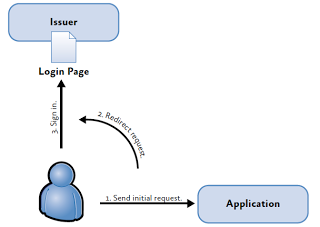
- the user opens up your website and click on some sign-in button.
- the application redirects the user to the Identity Provider website (the actual login page that has the login and password inputs are inside the IdP website and usually you get to customize that page for your purposes)
- then user enters the User Name and Password and asks for authentication.
- the User Name and password is post into the Identity provider and/or Security Token Issuer and after authenticating, the Issuer redirects to your application(you set that return Uri as the Audience Uri) and with the request, there is the Security Token that you can process
- WIF or any other middle-ware library validates the token and issues a cookie for the user.
- WIF or any middle-ware library, will extract the claims from the token and provide them to the application
- application processes the claims and enable/disables some menus and does what it usually does with the authorization information it got from the claims.
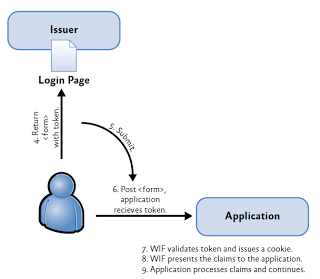
here is another context view of the whole process with the WAAD, Sign-in page and WIF in place for you to have a better understanding of the process:
right now I am thinking of having 3 more parts for deep diving into the implementation of this.
In the next two part, I’ll show you how to work with Windows Azure Active Directory tenant and will continue with configuring a web application to use this WAAD tenant.